
Overview
This article will provide an example of how to add and use the split string function in your projects. Split String is an advanced function used for splitting a string into its substrings based on a given delimiter/regular expression. It returns an array of strings after splitting an input string based on the delimiting regular expression.
Requirements
- eFORMz Composer.
Procedure
Adding Action to existing Procedure:
- Right-click on Actions within your Procedure.
- Navigate to Add Advanced Function.
- Select Split-String.
Split String example:
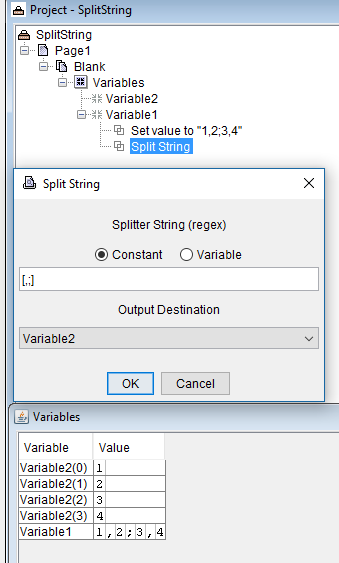
In the following example, a string is given two items to split on (comma and semicolon)
Before: 1,2;3,4
After:
1
2
3
4
For different regex patterns, you can try tools such as Regex101 to test out various patterns.
Assistance
If any further assistance is needed, please contact our Support team.
Related Articles
Comments
0 comments
Article is closed for comments.